Topics to review for interview
Question Summary:
Java questions:
Code to read from the file
Class vs Interface vs Abstract class
List vs set
Arraylist vs linkedlist
Overriding in Java
super and this keyword
Java Compile-Time Polymorphism and Runtime Polymorphism
Selenium questions:
Selenium components
1. Selenium IDE
2. Selenium Webdriver
3. Selenium Grid
types of Web locators and how to locate different elements
Asserts vs Verify
Explicit wait vs implicit wait
Close vs quit
How do you locate hidden element in Selenium
SQL/ DB questions:
Delete vs Truncate
Constraints
Foreign Key, Primary Key how to use them
MySQL Joins
MySQL INNER JOIN
MySQL LEFT JOIN
MySQL RIGHT JOIN
MySQL CROSS JOIN
SQL query for counting all employees of hr department
Different types of Join , Union / Union all
Have you used same table more than once your query
Linux questions:
Copy files with SCP
Copy files with SFTP
Commands related to top, sar (to debug system issues)
Cucumber questions:
1. Feature file <- For Non-technical people
2. Step Definition file <- For Selenium Automation Engineer
3. Runner file <- To run the Cucumber test
Cucumber is called Behavior Driven Development (BDD)
What is DOM
Jenkins job creation
Steps to build up QA environment. How many QA environments and difference between them in my previous company.
QA Strategy
How to create Test Strategy Document
Test Plan vs Test Strategy – Difference Between Them
QA methods and approaches
About current project
Architecture and high level business requirements of the project
How do you mock up test data
What Is Test Data? Test Data Preparation Techniques
How to Prepare Data that will Ensure Maximum Test Coverage?
Where is the data stored
What interfaces were used in the application to communicate between components and DB
What testing architecture do we use
What is your approach testing WebApp
1. Functionality Testing of a Website
2. Usability testing
3.Interface Testing
4. Database Testing
5. Compatibility testing
6. Performance Testing
7. Security testing
8 Intruder
9. Crowd Testing
1. Tell me about your background / yourself.
2. Tell me about your last project.
3. About framework.
4. Tell me about your strength and weakness.
1. Your typical day
2. What others like about you
3. Challenges while working on the project
4. Describe your automation framework
5. How do you manage your automation test results
6. How do you handle the bug you found.
GitLab interview questions
1. What is GitLab ?
2. Explain GitLab CI/CD and how you’ve used it in your projects.
3. What are GitLab Runners? How do you configure them?
4. How do you handle secrets and sensitive data in GitLab CI/CD pipelines?
5. How does GitLab support collaboration and code quality in teams?
Questions and Answers:
1. types of Web locators and how to locate different elements
Locating Strategies By ID
Locating Strategies By Name
Locating Strategies By Class Name
Locating Strategies By Tag Name
Locating Strategies By Link Text
Locating Strategies By Partial Link Text
Locating Strategies By CSS
Tag and ID
Tag and Class
Tag and Attribute
Tag, Class and Attribute
Sub-String Matches
Locating Strategies By XPath
2. Asserts vs Verify
In Selenium, Asserts are validations or checkpoints for an application
Types of Assertions
Hard Assertions
assertEquals()
Soft Assertions (Verify Method)
Verify in Selenium (also known as Soft Assertion)
softAssert.assertEquals
In a hard assertion, when the assertion fails, it terminates or aborts the test. If the tester does not want to terminate the script they cannot use hard assertions. To overcome this, one can use soft assertions.
3. Code to read from the file
https://www.studytonight.com/java-examples/reading-a-csv-file-in-java
demo.csv
Justin, 101, 9.1
Jessica, 102, 8.7
Clark, 103, 7.1
————————————-
OpenCsvExample.java
package Read_and_parse_CSV_file_Java;
import java.io.BufferedReader;
import java.io.FileReader;
import java.util.ArrayList;
import java.util.List;
import java.util.Arrays;
public class OpenCsvExample
{
public static void main(String[] args)
{
try
{
List< List<String> > data = new ArrayList<>();//list of lists to store data
String file = “C:\\Temp\\workspace\\Read_and_parse_CSV_file_Java\\src\\Read_and_parse_CSV_file_Java\\demo.csv”;//file path
FileReader fr = new FileReader(file);
BufferedReader br = new BufferedReader(fr);
//Reading until we run out of lines
String line = br.readLine();
while(line != null)
{
List<String> lineData = Arrays.asList(line.split(“,”));//splitting lines
data.add(lineData);
line = br.readLine();
}
//printing the fetched data
for(List<String> list : data)
{
for(String str : list)
System.out.print(str + ” “);
System.out.println();
}
br.close();
}
catch(Exception e)
{
System.out.print(e);
}
}
}
Output:
Justin 101 9.1
Jessica 102 8.7
Clark 103 7.1
Steps to build up QA environment. How many QA environments and difference between them in my previous company.
QA Strategy
How to create Test Strategy Document (Sample Template)
https://www.guru99.com/how-to-create-test-strategy-document.html
Test Plan vs Test Strategy – Difference Between Them
https://www.guru99.com/test-plan-v-s-test-strategy.html
What is Test Plan?
A Test Plan is defined as a document which outlines the scope, objective, method and weight on a software testing task
Test Strategy
Test Strategy in software testing is defined as a set of guiding principles that determines the test design & regulates how the software testing process will be done. The objective of the Test Strategy is to provide a systematic approach to the software testing process in order to ensure the quality, traceability, reliability and better planning.
Test strategy document
Step#1 Scope
Step#2 Test Approach
Step#3 Test Environment
Step#4 Testing Tools
Step#5 Release Control
Step#6 Risk Analysis
Step#7 Review and Approvals
QA Test Plan
TEST PLAN: What is, How to Create (with Example)
https://www.guru99.com/what-everybody-ought-to-know-about-test-planing.html
Test Plan
A Test Plan is a detailed document that describes the test strategy, objectives, schedule, estimation, deliverables, and resources required to perform testing for a software product
How to write a Test Plan
Analyze the product
Design the Test Strategy
Define Scope of Testing
Identify Testing Type
Document Risk & Issues
Create Test Logistics
Define the Test Objectives
Define Test Criteria
Suspension Criteria
Exit Criteria
Resource Planning
Human Resource
System Resource
Plan Test Environment
What is the Test Environment
How to setup the Test Environment
Schedule & Estimation
Determine Test Deliverables
QA methods and approaches
Software Testing Methodologies: Learn QA Models
https://www.guru99.com/testing-methodology.html
Waterfall model
Iterative development
Agile methodology
Extreme programming
Which Software Methodology to choose?
How to setup software testing methodologies?
SQL
Delete vs Truncate
DELETE is a DML(Data Manipulation Language) command and is used when we specify the row that we want to remove or delete from the table.
DELETE FROM TableName WHERE condition;
TRUNCATE is a DDL(Data Definition Language) command and is used to delete all the rows from a table.
TRUNCATE TABLE TableName;
Constraints
Constraints are used to limit the type of data that can go into a table. This ensures the accuracy and reliability of the data in the table. If there is any violation between the constraint and the data action, the action is aborted.
CREATE TABLE table_name (
column1 datatype constraint,
column2 datatype constraint,
column3 datatype constraint,
….
);
Foreign Key, Primary Key how to use them
What is Primary Key?
A primary key constrain is a column or group of columns that uniquely identifies every row in the table of the relational database management system. It cannot be a duplicate, meaning the same value should not appear more than once in the table.
A table can not have more than one primary key. Primary key can be defined at the column or the table level.
What is Foreign Key?
Foreign key is a column that creates a relationship between two tables. The purpose of the Foreign key is to maintain data integrity and allow navigation between two different instances of an entity. It acts as a cross-reference between two tables as it references the primary key of another table. Every relationship in the database should be supported by a foreign key.
About current project
Architecture and high level business requirements of the project
How do you mock up test data
What Is Test Data? Test Data Preparation Techniques With Example
What is Test Data? Test Data Preparation Techniques with Example
We can apply the following strategies handling the process of TDM:
1. Data from the production environment
2, Retrieving SQL queries that extract data from Client’s existing databases
3. Automated Data Generation Tools
How to Prepare Data that will Ensure Maximum Test Coverage?
Design your data considering the following categories:
1) No data:
Run your test cases on blank or default data. See if proper error messages are generated.
2) Valid data set:
Create it to check if the application is functioning as per requirements and valid input data is properly saved in database or files.
3) Invalid data set:
Prepare invalid data set to check application behavior for negative values, alphanumeric string inputs.
4) Illegal data format:
Make one data set of illegal data format. The system should not accept data in an invalid or illegal format. Also, check proper error messages are generated.
5) Boundary Condition dataset:
Dataset containing out of range data. Identify application boundary cases and prepare data set that will cover lower as well as upper boundary conditions.
6) The dataset for performance, load and stress testing: This data set should be large in volume.
This way creating separate datasets for each test condition will ensure complete test coverage.
Where is the data stored
What interfaces were used in the application to communicate between
components
DB
What is left join
LEFT JOIN , also called LEFT OUTER JOIN , returns all records from the left (first) table and the matched records from the right (second) table.
Have you used same table more than once your query
Yes.
Example:
SELECT c1.id as sender, c2.id as replier
FROM contacts c1, contacts c2
WHERE sender.id = replier.id
Selenium
Selenium IDE
Selenium Webdriver
Selenium Grid
What testing architecture do we use
What is DOM
How do you locate hidden element in Selenium
Resource:
https://www.tutorialspoint.com/how-to-interact-with-hidden-elements-in-selenium-webdriver
The hidden elements are the ones that are present in the DOM but not visible on the page. Mostly the hidden elements are defined by the CSS property style=”display:none;”. In case an element is a part of the form tag, it can be hidden by setting the attribute type to the value hidden.
Selenium by default cannot handle hidden elements and throws ElementNotVisibleException while working with them. Javascript Executor is used to handle hidden elements on the page. Selenium runs the Javascript commands with the executeScript method. The commands to be run are passed as arguments to the method.
package Selenium_Locate_Hidden_Element;
import java.util.concurrent.TimeUnit;
import org.openqa.selenium.By;
import org.openqa.selenium.JavascriptExecutor;
import org.openqa.selenium.WebDriver;
import org.openqa.selenium.chrome.ChromeDriver;
public class Locate_Hidden_Element {
public static void main(String[] args) {
// System Property for Chrome Driver
System.setProperty(“webdriver.chrome.driver”, “C:\\Temp\\Selenium\\Chrome_Driver\\chromedriver_win32\\chromedriver.exe”);
// Instantiate a ChromeDriver class.
WebDriver driver=new ChromeDriver();
//implicit wait
driver.manage().timeouts().implicitlyWait(5, TimeUnit.SECONDS);
//URL launch
driver.get(“https://courses.letskodeit.com/practice”);
// identify element and click
driver.findElement(By.id(“hide-textbox”)).click();
// Javascript executor class with executeScript method
JavascriptExecutor j = (JavascriptExecutor) driver;
// identify element and set value
j.executeScript(“document.getElementById(‘displayed-text’).value=’Selenium’;”);
String s = (String) j.executeScript(“return document.getElementById(‘displayed-text’).value”);
System.out.print(“Value entered in hidden field: ” +s);
//driver.close()
}
}
Explicit wait vs implicit wait
Implicit Wait: Implicitly wait is always wait for an entire HTML document to load in UI
driver.manage().timeouts().implicitlyWait(TimeOut,TimeUnit.SECONDS);
Explicit Wait: The Explicit wait always waits for an expected element to appear in UI
WebDriver wait
WebDriverWait wait = WebDriverWait(WebDriverReference,TimeOut);
Expected conditions
Fluent wait: It is used to find the web element repeatedly at regular intervals of time until the timeout or until the object gets found
Wait wait= new FluentWait(WebDriver reference)
.withTimeout(timeout,SECONDS)
.PollingEvery(timeout,SECONDS)
.ignoring(Exception.class);
Thread Wait
Thread.sleep(millseconds);
Close vs quit
close() closes only the current window on which Selenium is running automated tests.The WebDriver session, however, remains active.
On the other hand, the driver. quit() method closes all browser windows and ends the WebDriver session
Linux
Commands related to scp, sftp (how to copy remote files)
Copy files with SCP
Copy files without SCP with Port
scp file1 user@192.268.1.3:/home/user
Copy files with SCP with Port
scp -P 2390 file1 user@192.268.1.3:/home/user
Copy files with SFTP
SFTP is a secure file transfer program that also relies on SSH and is interactive. The tool is similar to FTP, but it uses SSH port 22
To establish an SFTP connection, use:
sftp user@192.168.1.3
If SSH is running on an alternate port, use:
sftp -oPort=2390 user@192.168.1.3
When using a passwordless connection and if the private key is named differently or stored in a different location than the default, use:
sftp -o IdentityFile=~/.ssh/id_rsa_key user@192.168.1.3
The example above connects to 192.168.1.3 using the private key at
~/.ssh/id_rsa_key.
What if you want to transfer the file /etc/resolv.conf file to /etc on the remote server?
In that case, use:
sftp user@192.168.1.3
sftp> cd /etc
sftp> put /etc/resolv.conf
To download a file named /opt/user_list from the remote server to the local system, do:
sftp user@192.168.1.3
sftp> cd /opt
sftp> get user_list
Commands related to top, sar (to debug system issues)
Now, let’s look at the three biggest causes of server slowdown: CPU, RAM, and disk I/O. CPU usage can cause overall slowness on the host, and difficulty completing tasks in a timely fashion. Some tools I use when looking at CPU are top and sar.
top
Checking CPU usage with top
The top utility gives you a real-time look at what’s going on with the server. By default, when top starts, it shows activity for all CPUs:
Example:
top
us: This percentage represents the amount of CPU consumed by user processes.
sy: This percentage represents the amount of CPU consumed by system processes.
id: This percentage represents how idle each CPU is
sar
For historical CPU performance data I rely on the sar command, which is provided by the sysstat package. On most server versions of Linux, sysstat is installed by default, but if it’s not, you can add it with your distro’s package manager.
The sar utility collects system data every 10 minutes via a cron job located in /etc/cron.d/sysstat (CentOS 7.6).
Example:
sar -u <- gives you info about all CPUs on the system, starting at midnight
Class vs Interface vs Abstract class
An abstract class permits you to make functionality that subclasses can implement or override.
Interface only permits you to state functionality but not to implement it.
A class can extend only one abstract class while a class can implement multiple interfaces.
Interface
1. Slow
2. Implement several Interfaces
3. A Class can implement multiple interfaces
4. Interface supports multiple inheritance
Abstract class
1. Fast
2. Only one abstract class
3. The class can inherit only one Abstract Class
4. Abstract class doesn’t support multiple inheritance
Important Reasons For Using Interfaces
1. Interfaces are used to achieve abstraction.
2. Designed to support dynamic method resolution at run time
3. It helps you to achieve loose coupling.
4. Allows you to separate the definition of a method from the inheritance hierarchy
Important Reasons For Using Abstract Class
1. Abstract classes offer default functionality for the subclasses.
2. Provides a template for future specific classes
3. Helps you to define a common interface for its subclasses
4. Abstract class allows code reusability.
Interface Syntax
Java Interface Example:
interface Pet
{
public void test();
}
class Dog implements Pet
{
public void test()
{
System.out.println(“Interface Method Implemented”);
}
public static void main(String args[])
{
Pet p = new Dog();
p.test();
}
}
Abstract Class Syntax
Abstract class example:
abstract class Shape
{
int b = 20;
abstract public void calculateArea();
}
public class Rectangle extends Shape
{
public static void main(String args[])
{
Rectangle obj = new Rectangle();
obj.b = 200;
obj.calculateArea();
}
public void calculateArea()
{
System.out.println(“Area is ” + (b * b));
}
}
SQL query for counting all employees of hr department
EMP_IDNO EMP_FNAME EMP_LNAME EMP_DEPT
——— ————— ————— ———-
127323 Michale Robbin 57
526689 Carlos Snares 63
843795 Enric Dosio 57
328717 Jhon Snares 63
444527 Joseph Dosni 47
659831 Zanifer Emily 47
847674 Kuleswar Sitaraman 57
748681 Henrey Gabriel 47
555935 Alex Manuel 57
539569 George Mardy 27
733843 Mario Saule 63
631548 Alan Snappy 27
839139 Maria Foster 57
SELECT emp_dept, COUNT(*)
FROM emp_details
GROUP BY emp_dept;
Output of the Query:
emp_dept count
27 2
57 5
47 3
63 3
Different types of Join , Union / Union all
JOIN
JOIN in SQL is used to combine data from many tables based on a matched condition between them. The data combined using JOIN statement results into new columns
SELECT Boys.Name, Boys.Age, Girls.Address,
FROM Boys
INNER JOIN Girls
ON Boys.Rollno = Girls.Rollno;
UNION
UNION in SQL is used to combine the result-set of two or more SELECT statements. The data combined using UNION statement is into results into new distinct rows.
SELECT Name
FROM Boys
WHERE Rollno < 16
UNION
SELECT Name
FROM Girls
WHERE Rollno > 9
UNION ALL
The UNION operator selects only distinct values by default. To allow duplicate values, use UNION ALL
SELECT City FROM Customers
UNION ALL
SELECT City FROM Suppliers
ORDER BY City;
List vs set
List
It is an ordered collection of objects in which duplicate values are allowed to store. List preserves the insertion order, it allows positional access and insertion of elements
Set
It is an unordered collection of objects in which duplicate values cannot be stored
// Implementation of List and Set in Java
import java.io.*;
import java.util.*;
class GFG {
public static void main(String[] args)
{
// List declaration
List<Integer> l = new ArrayList<>();
l.add(5);
l.add(6);
l.add(3);
l.add(5);
l.add(4);
// Set declaration
Set<Integer> s = new HashSet<>();
s.add(5);
s.add(6);
s.add(3);
s.add(5);
s.add(4);
// printing list
System.out.println(“List = ” + l);
// printing Set
System.out.println(“Set = ” + s);
}
}
Output
List = [5, 6, 3, 5, 4]
Set = [3, 4, 5, 6]
Arraylist vs linkedlist
What is your approach testing WebApp
https://www.guru99.com/web-application-testing.html
1. Functionality Testing of a Website
Functionality Testing of a Website is a process that includes several testing parameters like user interface, APIs, database testing, security testing, client and server testing and basic website functionalities. Functional testing is very convenient and it allows users to perform both manual and automated testing. It is performed to test the functionalities of each feature on the website.
Test all links
Outgoing links
Internal links
Anchor Links
MailTo Links
Test Forms
Test Cookies
Test HTML and CSS
Test business workflow
2. Usability testing:
Usability Testing has now become a vital part of any web based project. It can be carried out by testers like you or a small focus group similar to the target audience of the web application
Test the site Navigation
Test the Content
3.Interface Testing
Application
Web Server
Database Server
4. Database Testing
Test if any errors are shown while executing queries
Data Integrity is maintained while creating, updating or deleting data in database.
Check response time of queries and fine tune them if necessary.
Test data retrieved from your database is shown accurately in your web application
Tools that can be used: QTP, Selenium
5. Compatibility testing.
Compatibility tests ensures that your web application displays correctly across different devices
Browser Compatibility Test
6. Performance Testing:
This will ensure your site works under all loads
Website application response times at different connection speeds
Load test your web application to determine its behavior under normal and peak loads
Stress test your web site to determine its break point when pushed to beyond normal loads at peak time.
Test if a crash occurs due to peak load, how does the site recover from such an event
Make sure optimization techniques like gzip compression, browser and server side cache enabled to reduce load times
7. Security testing:
Security Testing is vital for e-commerce website that store sensitive customer information like credit cards.
Test unauthorized access to secure pages should not be permitted
Restricted files should not be downloadable without appropriate access
Check sessions are automatically killed after prolonged user inactivity
On use of SSL certificates, website should re-direct to encrypted SSL pages.
8) Intruder
Intruder is a powerful vulnerability scanner that will help you uncover the many weaknesses lurking in your web applications and underlying infrastructure
9. Crowd Testing:
You will select a large number of people (crowd) to execute tests which otherwise would have been executed a select group of people in the company. Crowdsourced testing is an interesting and upcoming concept and helps unravel many a unnoticed defects.
Cucumber mechanism
1. Feature file <- For Non-technical people
2. Step Definition file <- For Selenium Automation Engineer
3. Runner file <- To run the Cucumber test
Cucumber is called Behavior Driven Development (BDD)
1. Tell me about your background / yourself.
2. Tell me about your last project.
3. Different types of Join , Union / Union all
4. SQL query for counting all employees of hr department.
5. About framework.
6. Jenkins job creation.
7. Cucumber mechanism
8. Tell me about your strength and weakness.
9. Class vs Interface vs Abstract class.
10. List vs set.
11. Arraylist vs linkedlist
Here are some questions I remember:;
1. Tell me about yourself
2. Your typical day
3. What others like about you
4. Challenges while working on the project
5. Describe your automation framework
6. How do you manage your automation test results
7. SQL: Truncate vs Delete
8. SQL: Constraints
9. How do you handle the bug you found.
10. What is your approach testing WebApp
Overriding in Java
https://www.geeksforgeeks.org/overriding-in-java/
// A Simple Java program to demonstrate
// method overriding in java
// Base Class
class Parent {
void show()
{
System.out.println(“Parent’s show()”);
}
}
// Inherited class
class Child extends Parent {
// This method overrides show() of Parent
@Override
void show()
{
System.out.println(“Child’s show()”);
}
}
// Driver class
class Main {
public static void main(String[] args)
{
// If a Parent type reference refers
// to a Parent object, then Parent’s
// show is called
Parent obj1 = new Parent();
obj1.show();
// If a Parent type reference refers
// to a Child object Child’s show()
// is called. This is called RUN TIME
// POLYMORPHISM.
Parent obj2 = new Child();
obj2.show();
}
}
Output:
Parent’s show()
Child’s show()
MySQL Joins
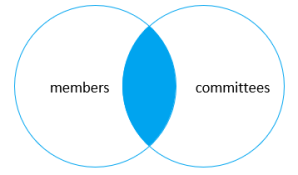
MySQL INNER JOIN
SELECT
m.member_id,
m.name AS member,
c.committee_id,
c.name AS committee
FROM
members m
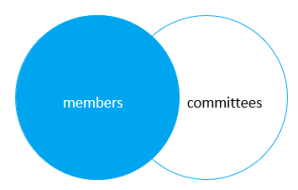
INNER JOIN committees c USING(name);
MySQL LEFT JOIN
SELECT
m.member_id,
m.name AS member,
c.committee_id,
c.name AS committee
FROM
members m
LEFT JOIN committees c USING(name);
SELECT
m.member_id,
m.name AS member,
c.committee_id,
c.name AS committee
FROM
members m
LEFT JOIN committees c USING(name)
WHERE c.committee_id IS NULL;

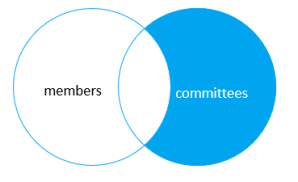
MySQL RIGHT JOIN
SELECT
m.member_id,
m.name AS member,
c.committee_id,
c.name AS committee
FROM
members m
RIGHT JOIN committees c on c.name = m.name;

SELECT
m.member_id,
m.name AS member,
c.committee_id,
c.name AS committee
FROM
members m
RIGHT JOIN committees c USING(name)
WHERE m.member_id IS NULL;
MySQL CROSS JOIN
SELECT
m.member_id,
m.name AS member,
c.committee_id,
c.name AS committee
FROM
members m
CROSS JOIN committees c;
The CROSS JOIN keyword returns all records from both tables (table1 and table2).

Arraylist vs linkedlist
Arraylist
1. ArrayList internally uses a dynamic array to store its elements.
2. ArrayList is slow as array manipulation is slower.
linkedlist
1. LinkedList uses Doubly Linked List to store its elements.
Java Doubly Linked List is a type of Linked List where each node apart from storing data has two links. The first link points to the previous node and the other link points to the next node of the list
2. LinkedList is faster being node based as not much bit shifting required.

Example of ArrayList vs LinkedList
import java.util.ArrayList;
import java.util.LinkedList;
import java.util.List;
public class JavaTester
{
public static void main(String args[])
{
List<String> list = new ArrayList<>();
list.add(“A”);
list.add(“B”);
list.add(“C”);
list.add(“D”);
List<String> list1 = new LinkedList<>();
list1.add(“A”);
list1.add(“B”);
list1.add(“C”);
list1.add(“D”);
System.out.println(list);
System.out.println(list1);
}
}
Output
[A, B, C, D]
[A, B, C, D]
What is DOM
What the Document Object Model is
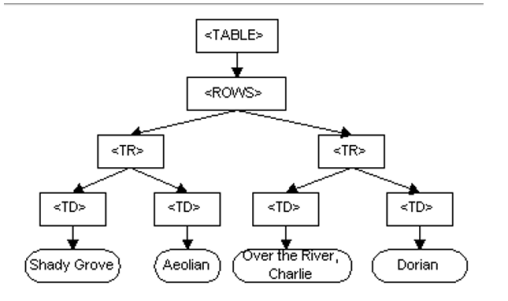
The Document Object Model is a programming API for documents. The object model itself closely resembles the structure of the documents it models. For instance, consider this table, taken from an HTML document:
<TABLE>
<ROWS>
<TR>
<TD>Shady Grove</TD>
<TD>Aeolian</TD>
</TR>
<TR>
<TD>Over the River, Charlie</TD>
<TD>Dorian</TD>
</TR>
</ROWS>
</TABLE>
The Document Object Model represents this table like this:
GitLab interview questions:
1. What is GitLab?
Answer:
GitLab is a complete DevOps platform that provides a single application for the entire software development lifecycle — from planning to CI/CD, security, and monitoring. Unlike GitHub or Bitbucket, which require third-party integrations for CI/CD and DevOps tooling, GitLab offers built-in CI/CD, Auto DevOps, code quality analysis, security scanning, and more. It’s particularly valuable for organizations looking for an all-in-one solution, especially self-managed installations.
2. Explain GitLab CI/CD and how you’ve used it in your projects.
Answer:
GitLab CI/CD is an integrated part of GitLab that allows automation of build, test, and deployment processes using a .gitlab-ci.yml file. In my previous role, I set up pipelines to automatically test and deploy microservices to Kubernetes. I used GitLab runners to execute jobs, implemented parallel testing to reduce time, and used environment variables and caching to optimize builds. I also configured environments like staging and production with manual and scheduled deployments.
3. What are GitLab Runners? How do you configure them?
Answer:
A GitLab Runner is an application used to run CI/CD jobs from GitLab. Runners can be shared or specific to a project/group, and they can run in Docker, Kubernetes, shell, or other executors. I’ve configured both shared and project-specific runners. Typically, I install the runner, register it using a GitLab registration token, and configure the executor type (e.g., Docker). I also manage runners’ tags to control which jobs can run on which runners.
4. How do you handle secrets and sensitive data in GitLab CI/CD pipelines?
Answer:
GitLab provides several secure ways to manage secrets. I typically use GitLab CI/CD variables, set at the project or group level with the “Protected” and “Masked” flags for added security. For more complex needs, like rotating credentials or accessing secret stores, I’ve integrated HashiCorp Vault with GitLab pipelines. I avoid hardcoding secrets in .gitlab-ci.yml and use dotenv files or environment variables wherever possible.
5. How does GitLab support collaboration and code quality in teams?
Answer:
GitLab enhances collaboration through features like merge requests, code reviews, inline comments, and issue tracking. We used merge request approvals, code owners, and suggested changes to ensure high code quality. For automated checks, I integrated GitLab CI/CD to run linters, unit tests, and code quality scanners. I also used GitLab’s Protected Branches and Push Rules to enforce standards and workflows across the team.
 Computer Software Training College, USA