Question 103: Can you achieve Runtime Polymorphism by data members?
Answer:
Method overriding:
If subclass (child class) has the same method as declared in the parent class, it is known as method overriding in Java. In other words, If a subclass provides the specific implementation of the method that has been declared by one of its parent class, it is known as method overriding
Data members:
In Java Data members is nothing but instance variables.
No, because method overriding is used to achieve runtime polymorphism and data members cannot be overridden. We can override the member functions but not the data members. Consider the example given below.
package Question_103;
class Bike{
int speedlimit=90;
}
class Honda3 extends Bike{
int speedlimit=150;
public static void main(String args[])
{
Bike obj=new Honda3();
System.out.println(obj.speedlimit);//90
}
}
Output:
90
Question 106: What is Java instanceOf operator?
Answer:
The instanceof in Java is also known as type comparison operator because it compares the instance with type. It returns either true or false. If we apply the instanceof operator with any variable that has a null value, it returns false. Consider the following example.
public class Simple1 {
public static void main(String[] args) {
Simple1 s=new Simple1();
System.out.println(s instanceof Simple1);
}
}
Output
true
Question 12: How to compile and run from command line
Answer:
public class A {
public static void main(String[] args) {
System.out.println(“Hello java”);
}
}
// How to compile and run from command line:
cd C:\Temp\workspace\Java_Interview_Questions\src\Question_12
C:\Temp\workspace\Java_Interview_Questions\src\Question_12>javac A.java
C:\Temp\workspace\Java_Interview_Questions\src\Question_12>cd ..
C:\Temp\workspace\Java_Interview_Questions\src>java Question_12.A
Hello java
Question 126: How to create packages in Java?
Answer:
If you are using the programming IDEs like Eclipse, NetBeans, MyEclipse, etc. click on file->new->project and eclipse will ask you to enter the name of the package. It will create the project package containing various directories such as src, etc. If you are using an editor like notepad for java programming, use the following steps to create the package.
Define a package package_name. Create the class with the name class_name and save this file with your_class_name.java.
Now compile the file by running the following command on the terminal.
javac -d . your_class_name.java
The above command creates the package with the name package_name in the present working directory.
Now, run the class file by using the absolute class file name, like following.
java package_name.class_name
public class A {
public static void main(String[] args) {
System.out.println(“Hello java”);
}
}
// How to create packages in Java?:
cd C:\Temp\workspace\Java_Interview_Questions\src\Question_126
javac -d . A.java
java Question_126.A
Hello java
Question 136: Is it necessary that each try block must be followed by a catch block?
public class Main {
public static void main(String[] args) {
try{
int a = 1;
System.out.println(a/0);
}
finally
{
System.out.println(“rest of the code…”);
}
}
}
Answer:
Output:
Exception in thread main java.lang.ArithmeticException:/ by zero
rest of the code…
Question 137: What is the output of the following Java program?
public class ExceptionHandlingExample {
public static void main(String[] args) {
try
{
int a = 1/0;
System.out.println(“a = “+a);
}
//catch(Exception e){System.out.println(e);}
catch(ArithmeticException ex){System.out.println(ex);}
}
}
Answer:
Output
ExceptionHandlingExample.java:10: error: exception ArithmeticException has already been caught
catch(ArithmeticException ex){System.out.println(ex);}
^
1 error
Explanation
ArithmaticException is the subclass of Exception. Therefore, it can not be used after Exception. Since Exception is the base class for all the exceptions, therefore, it must be used at last to handle the exception. No class can be used after this.
Question 142: What is the output of the following Java program?
public class Main{
public static void main(String []args){
try
{
//throw 90;
}
catch(Exception e){System.out.println(e);}
//catch(int e){System.out.println(“Caught the exception “+e);}
}
}
Answer:
Output
Main.java:6: error: incompatible types: int cannot be converted to Throwable
throw 90;
^
Main.java:8: error: unexpected type
catch(int e){
^
required: class
found: int
2 errors
Explanation
In Java, the throwable objects can only be thrown. If we try to throw an integer object, The compiler will show an error since we can not throw basic data type from a block of code.
Question 143: What is the output of the following Java program?
public class Calculation extends Exception{
public Calculation()
{
System.out.println(“Calculation class is instantiated”);
}
public void add(int a, int b)
{
System.out.println(“The sum is “+(a+b));
}
}
public class Main {
public static void main(String[] args) {
try
{
throw new Calculation();
}
catch(Calculation c){
c.add(10,20);
}
}
}
Answer:
Output
Calculation class is instantiated
The sum is 30
Explanation
The object of Calculation is thrown from the try block which is caught in the catch block. The add() of Calculation class is called with the integer values 10 and 20 by using the object of this class. Therefore there sum 30 is printed. The object of the Main class can only be thrown in the case when the type of the object is throwable. To do so, we need to extend the throwable class.
Question 147: What is the output of the following Java program?
public class Main
{
void a()
{
try{
System.out.println(“a(): Main called”);
b();
}catch(Exception e)
{
System.out.println(“Exception is caught”);
}
}
void b() throws Exception
{
try{
System.out.println(“b(): Main called”);
c();
}catch(Exception e){
throw new Exception();
}
finally
{
System.out.println(“finally block is called”);
}
}
void c() throws Exception
{
throw new Exception();
}
public static void main (String args[])
{
Main m = new Main();
m.a();
}
}
Answer:
Output
a(): Main called
b(): Main called
finally block is called
Exception is caught
Explanation
In the main method, a() of Main is called which prints a message and call b(). The method b() prints some message and then call c(). The method c() throws an exception which is handled by the catch block of method b. However, It propagates this exception by using throw Exception() to be handled by the method a(). As we know, finally block is always executed therefore the finally block in the method b() is executed first and prints a message. At last, the exception is handled by the catch block of the method a().
Question 148: What is the output of the following Java program?
public class Calculation
{
int a;
public Calculation(int a)
{
this.a = a;
}
public int add()
{
a = a + 1;
try
{
a = a+1;
try
{
a = a + 1;
throw new Exception();
}catch(Exception e){
a = a + 1;
}
}catch(Exception e)
{
a = a + 1;
}
return a;
}
public static void main (String args[])
{
Calculation c = new Calculation(1);
int result = c.add();
System.out.println(“result = “+result);
}
}
Answer:
Output
result = 5
Explanation
The instance variable a of class Calculation is initialized to 1 using the class constructor which is called while instantiating the class. The add method is called which returns an integer value result. In add() method, a is incremented by 1 to be 2. Then, in the first try block, 1 is again incremented by 1 to be 3. In the second try block, a is incremented by 1 to be 4. The second try block throws the exception which is caught by the catch block associated with this try block. The catch block again alters the value of a by incremented it by 1 to make it 5. Thus the add() method returns 5 which is assigned to result. However, the catch block associated with the outermost try block will never be executed since there is no exception which can be handled by this catch block.
Question 150: What is the meaning of immutable regarding String?
class Testimmutablestring{
public static void main(String args[]){
String s=”Sachin”;
s.concat(” Tendulkar”);//concat() method appends the string at the end
System.out.println(s);//will print Sachin because strings are immutable objects
}
}
Answer:
Output
Sachin
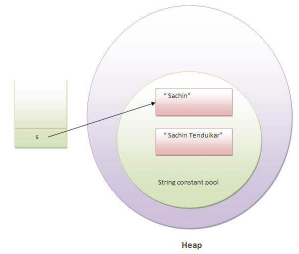
Now it can be understood by the diagram given below. Here Sachin is not changed but a new object is created with sachintendulkar. That is why string is known as immutable.
Question 156: What is the output of the following Java program?
public class Test {
public static void main(String[] args) {
String a = new String(“Sharma is a good player”);
String b = “Sharma is a good player”;
if(a == b)
{
System.out.println(“a == b”);
}
if(a.equals(b))
{
System.out.println(“a equals b”);
}
}
}
Answer:
Output
a equals b
Explanation
The operator == also check whether the references of the two string objects are equal or not. Although both of the strings contain the same content, their references are not equal because both are created by different ways(Constructor and String literal) therefore, a == b is unequal. On the other hand, the equal() method always check for the content. Since their content is equal hence, a equals b is printed.
Question 157: What is the output of the following Java program?
public class Test {
public static void main(String[] args) {
String s1 = “Sharma is a good player”;
String s2 = new String(“Sharma is a good player”);
s2 = s2.intern();
System.out.println(s1 ==s2);
}
}
Answer:
Output
true
Explanation
The intern method returns the String object reference from the string pool. In this case, s1 is created by using string literal whereas, s2 is created by using the String pool. However, s2 is changed to the reference of s1, and the operator == returns true.
Question 161: What is the purpose of toString() method in Java?
public class Student {
int rollno;
String name;
String city;
Student(int rollno, String name, String city){
this.rollno=rollno;
this.name=name;
this.city=city;
}
public String toString(){//overriding the toString() method
return rollno+” “+name+” “+city;
}
public static void main(String[] args) {
Student s1=new Student(101,”Raj”,”lucknow”);
Student s2=new Student(102,”Vijay”,”ghaziabad”);
System.out.println(s1);//compiler writes here s1.toString()
System.out.println(s2);//compiler writes here s2.toString()
}
}
Answer:
Output:
101 Raj lucknow
102 Vijay ghaziabad
Question 163: Write a Java program to count the number of words present in a string?
public class Test {
public static void main(String[] args) {
String s = “Sharma is a good player and he is so punctual”;
String words[] = s.split(” “);
System.out.println(words[0]);
System.out.println(words[1]);
System.out.println(words[2]);
System.out.println(words[3]);
System.out.println(words[4]);
System.out.println(“The Number of words present in the string are : “+words.length);
}
}
Answer:
Output
Sharma
is
a
good
player
The Number of words present in the string are : 10
Question 167: What is the output of the following Java program?
import java.util.regex.*;
public class RegexExample2 {
public static void main(String[] args) {
System.out.println(Pattern.matches(“.s”, “as”)); //line 4
System.out.println(Pattern.matches(“.s”, “mk”)); //line 5
System.out.println(Pattern.matches(“.s”, “mst”)); //line 6
System.out.println(Pattern.matches(“.s”, “amms”)); //line 7
System.out.println(Pattern.matches(“..s”, “mas”)); //line 8
}
}
Answer:
Output
true
false
false
false
true
Explanation
line 4 prints true since the second character of string is s, line 5 prints false since the second character is not s, line 6 prints false since there are more than 3 characters in the string, line 7 prints false since there are more than 2 characters in the string, and it contains more than 2 characters as well, line 8 prints true since the third character of the string is s.
Question 180: What is gc()?
public class TestGarbage1 {
public void finalize(){System.out.println(“object is garbage collected”);}
public static void main(String[] args) {
TestGarbage1 s1=new TestGarbage1();
TestGarbage1 s2=new TestGarbage1();
s1=null;
s2=null;
System.gc();
}
}
Answer:
Output
object is garbage collected
object is garbage collected
Question 183: What is the purpose of the finalize() method?
The finalize() method is invoked just before the object is garbage collected. It is used to perform cleanup processing. The Garbage collector of JVM collects only those objects that are created by new keyword. So if you have created an object without new, you can use the finalize method to perform cleanup processing (destroying remaining objects). The cleanup processing is the process to free up all the resources, network which was previously used and no longer needed. It is essential to remember that it is not a reserved keyword, finalize method is present in the object class hence it is available in every class as object class is the superclass of every class in java. Here, we must note that neither finalization nor garbage collection is guaranteed. Consider the following example.
public class FinalizeTest {
int j=12;
void add()
{
j=j+12;
System.out.println(“J=”+j);
}
public void finalize()
{
System.out.println(“Object is garbage collected”);
}
public static void main(String[] args) {
new FinalizeTest().add();
System.gc();
new FinalizeTest().add();
}
}
Answer:
Output
J=24
J=24
Object is garbage collected
Question 193: What are the FileInputStream and FileOutputStream?
Java FileOutputStream is an output stream used for writing data to a file. If you have some primitive values to write into a file, use FileOutputStream class. You can write byte-oriented as well as character-oriented data through the FileOutputStream class. However, for character-oriented data, it is preferred to use FileWriter than FileOutputStream. Consider the following example of writing a byte into a file.
import java.io.FileOutputStream;
public class FileOutputStreamExample {
public static void main(String args[]){
try{
FileOutputStream fout=new FileOutputStream(“D:\\testout.txt”);
fout.write(65);
fout.close();
System.out.println(“success…”);
}catch(Exception e){System.out.println(e);}
}
}
Java FileInputStream class obtains input bytes from a file. It is used for reading byte-oriented data (streams of raw bytes) such as image data, audio, video, etc. You can also read character-stream data. However, for reading streams of characters, it is recommended to use FileReader class. Consider the following example for reading bytes from a file.
import java.io.FileInputStream;
public class DataStreamExample {
public static void main(String args[]){
try{
FileInputStream fin=new FileInputStream(“D:\\testout.txt”);
int i=fin.read();
System.out.print((char)i);
fin.close();
}catch(Exception e){System.out.println(e);}
}
}
Question 198: In Java, how you can take input from the console?
In Java, there are three ways by using which, we can take input from the console.
Using BufferedReader class: we can take input from the console by wrapping System.in into an InputStreamReader and passing it into the BufferedReader. It provides an efficient reading as the input gets buffered. Consider the following example.
import java.io.BufferedReader;
import java.io.IOException;
import java.io.InputStreamReader;
public class Person {
public static void main(String[] args) {
System.out.println(“Enter the name of the person”);
BufferedReader reader = new BufferedReader(new InputStreamReader(System.in));
String name = null;
try {
name = reader.readLine();
} catch (IOException e) {
// TODO Auto-generated catch block
e.printStackTrace();
}
System.out.println(name);
}
}
Answer:
Output
Enter the name of the person
mirza
mirza
Question 20: What is the output of the following Java program?
public class Test {
public static void main(String[] args) {
System.out.println(10 + 20 + “Javatpoint”);
System.out.println(“Javatpoint” + 10 + 20);
}
}
Answer:
The output of the above code will be
30Javatpoint
Javatpoint1020
Explanation
In the first case, 10 and 20 are treated as numbers and added to be 30. Now, their sum 30 is treated as the string and concatenated with the string Javatpoint. Therefore, the output will be 30Javatpoint.
In the second case, the string Javatpoint is concatenated with 10 to be the string Javatpoint10 which will then be concatenated with 20 to be Javatpoint1020.
Question 21: What is the output of the following Java program?
public class Test {
public static void main(String[] args) {
System.out.println(10 * 20 + “Javatpoint”);
System.out.println(“Javatpoint” + 10 * 20);
}
}
Answer:
The output of the above code will be
200Javatpoint
Javatpoint200
Explanation
In the first case, The numbers 10 and 20 will be multiplied first and then the result 200 is treated as the string and concatenated with the string Javatpoint to produce the output 200Javatpoint.
In the second case, The numbers 10 and 20 will be multiplied first to be 200 because the precedence of the multiplication is higher than addition. The result 200 will be treated as the string and concatenated with the string Javatpoint to produce the output as Javatpoint200.
Question 22: What is the output of the following Java program?
public class Test {
public static void main(String[] args) {
for(int i=0; i < 2; i++)
//for(int i=0; 0; i++)
{
System.out.println(i + ” Hello Javatpoint”);
}
}
}
Answer:
The above code will give the compile-time error because the for loop demands a boolean value in the second part and we are providing an integer value, i.e., 0.
Question 248: How to perform Bubble Sort in Java?
public class BubbleSort {
public static void main(String[] args) {
int[] a = {10, 9, 7, 101, 23, 44, 12, 78, 34, 23};
for(int i=0;i<10;i++)
{
for (int j=0;j<10;j++)
{
if(a[i]<a[j])
{
int temp = a[i];
a[i]=a[j];
a[j] = temp;
}
}
}
System.out.println(“Printing Sorted List …”);
for(int i=0;i<10;i++)
{
System.out.println(a[i]);
}
}
}
Answer:
Output
Printing Sorted List …
7
9
10
12
23
23
34
44
78
101
Question 249: How to perform Binary Search in Java?
Consider the following program to perform the binary search in Java.
import java.util.*;
public class BinarySearch {
public static void main(String[] args)
{
int[] arr = {16, 19, 20, 23, 45, 56, 78, 90, 96, 100};
int item, location = -1;
System.out.println(“Enter the item which you want to search”);
Scanner sc = new Scanner(System.in);
item = sc.nextInt();
location = binarySearch(arr,0,9,item);
if(location != -1)
System.out.println(“the location of the item is “+location);
else
System.out.println(“Item not found”);
}
public static int binarySearch(int[] a, int beg, int end, int item)
{
int mid;
if(end >= beg)
{
mid = (beg + end)/2;
if(a[mid] == item)
{
return mid+1;
}
else if(a[mid] < item)
{
return binarySearch(a,mid+1,end,item);
}
else
{
return binarySearch(a,beg,mid-1,item);
}
}
return -1;
}
}
Answer:
Output
Enter the item which you want to search
20
the location of the item is 3
Question 29: What is the purpose of a default constructor?
public class Student3 {
int id;
String name;
void display(){System.out.println(id+” “+name);}
public static void main(String[] args) {
Student3 s1=new Student3();
Student3 s2=new Student3();
s1.display();
s2.display();
}
}
Answer:
Output:
0 null
0 nullThe purpose of the default constructor is to assign the default value to the objects. The java compiler creates a default constructor implicitly if there is no constructor in the class.Explanation: In the above class, you are not creating any constructor, so compiler provides you a default constructor. Here 0 and null values are provided by default constructor.
Question 33: Can we overload the constructors?
Yes, the constructors can be overloaded by changing the number of arguments accepted by the constructor or by changing the data type of the parameters. Consider the following example.
public class Test {
int i;
public Test(int k)
{
i=k;
}
public Test(int k, int m)
{
System.out.println(“Hi I am assigning the value max(k, m) to i”);
if(k>m)
{
i=k;
}
else
{
i=m;
}
}
public static class Main
{
public static void main(String[] args) {
Test test1 = new Test(10);
Test test2 = new Test(12, 15);
System.out.println(test1.i);
System.out.println(test2.i);
}
}
}
Answer:
In the above program, The constructor Test is overloaded with another constructor. In the first call to the constructor, The constructor with one argument is called, and i will be initialized with the value 10. However, In the second call to the constructor, The constructor with the 2 arguments is called, and i will be initialized with the value 15.
Question 36: What is the output of the following Java program?
public class Test {
Test(int a, int b)
{
System.out.println(“#1 a = “+a+” b = “+b);
}
Test(int a, float b)
{
System.out.println(“#2 a = “+a+” b = “+b);
}
public static void main(String[] args) {
byte a = 10;
byte b = 15;
Test test = new Test(a,b);
}
}
Answer:
The output of the following program is:
#1 a = 10 b = 15
Here, the data type of the variables a and b, i.e., byte gets promoted to int, and the first parameterized constructor with the two integer parameters is called.
Question 37: What is the output of the following Java program?
public class Test {
int i;
public static class Main
{
public static void main(String[] args) {
Test test = new Test();
System.out.println(test.i);
}
}
}
Answer:
Output
0
The output of the program is 0 because the variable i is initialized to 0 internally. As we know that a default constructor is invoked implicitly if there is no constructor in the class, the variable i is initialized to 0 since there is no constructor in the class.
Question 38: What is the output of the following Java program?
public class Test {
Test()
{
System.out.println(“Default constructor”);
}
int test_a, test_b;
Test(int a, int b)
{
test_a = a;
test_b = b;
}
public static void main(String[] args) {
Test test = new Test(10, 20);
Test test2 = new Test();
System.out.println(test.test_a+” “+test.test_b);
}
}
Answer:
There is a compiler error in the program because there is a call to the default constructor in the main method which is not present in the class. However, there is only one parameterized constructor in the class Test. Therefore, no default constructor is invoked by the constructor implicitly.
Question 39: What is the static variable?
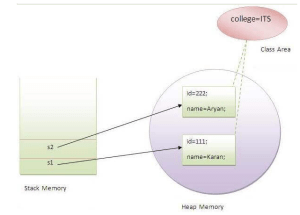
The static variable is used to refer to the common property of all objects (that is not unique for each object), e.g., The company name of employees, college name of students, etc. Static variable gets memory only once in the class area at the time of class loading. Using a static variable makes your program more memory efficient (it saves memory). Static variable belongs to the class rather than the object.
class Student8
{
int rollno;
String name;
static int count;
//int count;
static String college =”ITS”;
Student8(int r,String n)
{
rollno = r;
name = n;
}
void display ()
{
count++;
System.out.println(rollno+” “+name+” “+college + ” ” + count);
}
public static void main(String args[])
{
Student8 s1 = new Student8(111,”Karan”);
Student8 s2 = new Student8(222,”Aryan”);
s1.display();
s1.display();
s2.display();
s2.display();
}
}
Answer:
Output:
111 Karan ITS 1
111 Karan ITS 2
222 Aryan ITS 3
222 Aryan ITS 4
Question 44: What is the static block?
Static block is used to initialize the static data member. It is executed before the main method, at the time of class loading.
public class A2 {
static
{
System.out.println(“static block is invoked”);
}
public static void main(String[] args) {
System.out.println(“Hello main”);
}
}
Answer:
Output
static block is invoked
Hello main
Question 53: Can we assign the reference to this variable?
No, this cannot be assigned to any value because it always points to the current class object and this is the final reference in Java. However, if we try to do so, the compiler error will be shown. Consider the following example.
public class Test {
public Test()
{
// this can not be assigned any value
//this = null;
//this = 10;
System.out.println(“Test class constructor called”);
}
public static void main(String[] args) {
Test t = new Test();
}
}
Answer:
Output
Test.java:5: error: cannot assign a value to final variable this
this = null;
^
1 error
Question 54: Can this keyword be used to refer static members?
Yes, It is possible to use this keyword to refer static members because this is just a reference variable which refers to the current class object. However, as we know that, it is unnecessary to access static variables through objects, therefore, it is not the best practice to use this to refer static members. Consider the following example.
public class Test {
//static int i = 10;
int i = 10;
public Test ()
{
int i = 20;
System.out.println(“Test instance variable:” + this.i);
System.out.println(“Local variable: ” + i);
}
public static void main(String[] args) {
Test t = new Test();
Test2 t2 = new Test2();
}
}
public class Test2 {
int i = 30;
public Test2 ()
{
System.out.println(“Test2 instance variable:” + this.i);
}
}
Answer:
Output
Test instance variable:10
local variable: 20
Test2 instance variable:30
Question 55: How can constructor chaining be done using this keyword?
Constructor chaining enables us to call one constructor from another constructor of the class with respect to the current class object. We can use this keyword to perform constructor chaining within the same class. Consider the following example which illustrates how can we use this keyword to achieve constructor chaining.
public class Employee {
int id,age;
String name, address;
public Employee (int age)
{
this.age = age;
}
public Employee(int id, int age)
{
this(age);
this.id = id;
}
public Employee(int id, int age, String name, String address)
{
this(id, age);
this.name = name;
this.address = address;
}
public static void main(String[] args) {
Employee emp1 = new Employee(34);
System.out.println(“age: “+emp1.age);
Employee emp2 = new Employee(103, 25);
System.out.println(“ID: “+emp2.id+”age: “+emp2.age);
Employee emp = new Employee(105, 22, “Vikas”, “Delhi”);
System.out.println(“ID: “+emp.id+” Name:”+emp.name+” age:”+emp.age+” address: “+emp.address);
}
}
Answer:
Output
age: 34
ID: 103age: 25
ID: 105 Name:Vikas age:22 address: Delhi
Question 60: Why is multiple inheritance not supported in java?
To reduce the complexity and simplify the language, multiple inheritance is not supported in java. Consider a scenario where A, B, and C are three classes. The C class inherits A and B classes. If A and B classes have the same method and you call it from child class object, there will be ambiguity to call the method of A or B class.
Since the compile-time errors are better than runtime errors, Java renders compile-time error if you inherit 2 classes. So whether you have the same method or different, there will be a compile time error.
class A{
void msg(){System.out.println(“Hello”);}
}
class B{
void msg(){System.out.println(“Welcome”);}
}
//public class C extends A {
public class C extends B {
// multiple inheritance below is not supported in java
//public class C extends A,B {
public static void main(String[] args) {
C obj=new C();
obj.msg();//Now which msg() method would be invoked?
}
}
Answer:
Output
Compile Time Error
Question 61: What is aggregation?
Aggregation can be defined as the relationship between two classes where the aggregate class contains a reference to the class it owns. Aggregation is best described as a has-a relationship. For example, The aggregate class Employee having various fields such as age, name, and salary also contains an object of Address class having various fields such as Address-Line 1, City, State, and pin-code. In other words, we can say that Employee (class) has an object of Address class. Consider the following example.
public class Address {
String city,state,country;
public Address(String city, String state, String country) {
this.city = city;
this.state = state;
this.country = country;
}
}
public class Emp {
int id;
String name;
Address address;
public Emp(int id, String name,Address address) {
this.id = id;
this.name = name;
this.address=address;
}
void display(){
System.out.println(id+” “+name);
System.out.println(address.city+” “+address.state+” “+address.country);
}
public static void main(String[] args) {
Address address1=new Address(“gzb”,”UP”,”india”);
Address address2=new Address(“gno”,”UP”,”india”);
Emp e=new Emp(111,”varun”,address1);
Emp e2=new Emp(112,”arun”,address2);
e.display();
e2.display();
}
}
Answer:
Output
111 varun
gzb UP india
112 arun
gno UP india
Question 66: How can constructor chaining be done by using the super keyword?
public class Person {
String name,address;
int age;
public Person(int age, String name, String address)
{
this.age = age;
this.name = name;
this.address = address;
}
//Person class instance variables
String name2 = “James”,address2 = “123 Paterson Street”;
int age2 = 35;
public void Person2()
{
System.out.println(“Person class instance variables: ” + this.age2 + “,” + this.name2 + “,” + this.address2);
}
}
public class Employee extends Person {
float salary;
public Employee(int age, String name, String address, float salary)
{
super(age,name,address);
this.salary = salary;
}
//Employee class instance variables
String name2 = “Henry”,address2 = “567 Robert Street”;
int age2 = 45;
float salary2 = 50000;
public void Employee2()
{
//Employee2 method local variables
String name2 = “Jack”,address2 = “987 Piscataway Street”;
int age2 = 60;
super.Person2();
System.out.println(“Employee class instance variable: ” + this.salary2);
System.out.println(“Employee class instance variables: ” + this.age2 + “,” + this.name2 + “,” + this.address2);
System.out.println(“Employee2 method local variables: ” + age2 + “,” + name2 + “,” + address2);
}
}
public class Test {
public static void main(String[] args) {
Employee e = new Employee(22, “Mukesh”, “Delhi”, 90000);
System.out.println(“Name: “+e.name+” Salary: “+e.salary+” Age: “+e.age+” Address: “+e.address);
e.Employee2();
}
}
Answer:
Output
Name: Mukesh Salary: 90000.0 Age: 22 Address: Delhi
Person class instance variables: 35,James,123 Paterson Street
Employee class instance variable: 50000.0
Employee class instance variables: 45,Henry,567 Robert Street
Employee2 method local variables: 60,Jack,987 Piscataway Street
Question 69: What is the output of the following Java program?
public class Person {
public Person()
{
System.out.println(“Person class constructor called”);
}
}
public class Employee extends Person {
public Employee()
{
System.out.println(“Employee class constructor called”);
}
public static void main(String[] args) {
Employee e = new Employee();
}
}
Answer:
Output
Person class constructor called
Employee class constructor called
Explanation
The super() is implicitly invoked by the compiler if no super() or this() is included explicitly within the derived class constructor. Therefore, in this case, The Person class constructor is called first and then the Employee class constructor is called.
Question 70: Can you use this() and super() both in a constructor?
public class Test {
Test()
{
//super();
//this();
System.out.println(“Test class object is created”);
}
public static void main(String[] args) {
Test t = new Test();
}
}
Answer:
Output:
Test.java:5: error: call to this must be first statement in constructor
Question 73: Why is method overloading not possible by changing the return type in java?
In Java, method overloading is not possible by changing the return type of the program due to avoid the ambiguity.
public class Adder {
static int add(int a,int b){return a+b;}
static double add(int a,int b){return a+b;}
}
public class TestOverloading3 {
public static void main(String[] args) {
System.out.println(Adder.add(11,11));//ambiguity
}
}
Answer:
Output:
Compile Time Error: method add(int, int) is already defined in class Adder
Question 74: Can we overload the methods by making them static?
No, We cannot overload the methods by just applying the static keyword to them (number of parameters and types are the same). Consider the following example.
public class Animal {
void consume(int a)
{
System.out.println(a+” consumed!!”);
}
static void consume_2(int a)
//static void consume(int a)
{
System.out.println(“consumed static “+a);
}
public static void main(String[] args) {
Animal a = new Animal();
a.consume(10);
//Animal.consume(20);
Animal.consume_2(20);
}
}
Answer:
Output
Animal.java:7: error: method consume(int) is already defined in class Animal
static void consume(int a)
Animal.java:15: error: non-static method consume(int) cannot be referenced from a static context
Animal.consume(20);
2 errors
Question 76: What is method overloading with type promotion?
Answer:
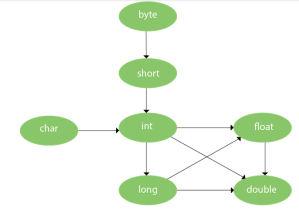
By Type promotion is method overloading, we mean that one data type can be promoted to another implicitly if no exact matching is found.
As displayed in the above diagram, the byte can be promoted to short, int, long, float or double. The short datatype can be promoted to int, long, float or double. The char datatype can be promoted to int, long, float or double and so on. Consider the following example.
public class OverloadingCalculation1 {
void sum(int a,long b){System.out.println(a+b);}
void sum(int a,int b,long c){System.out.println(a+b+c);}
public static void main(String[] args) {
OverloadingCalculation1 obj=new OverloadingCalculation1();
byte a = 20;
short b = 30;
int c = 10;
obj.sum(a,b);//now second int literal will be promoted to long
obj.sum(a,b,c);
}
}
Output
50
60
Question 77: What is the output of the following Java program?
public class OverloadingCalculation3 {
//void sum(int a,long b){System.out.println(“a method invoked”);}
void sum(long a,int b){System.out.println(“b method invoked”);}
public static void main(String[] args) {
OverloadingCalculation3 obj=new OverloadingCalculation3();
obj.sum(20,20);//now ambiguity
}
}
Answer:
Output
OverloadingCalculation3.java:7: error: reference to sum is ambiguous
obj.sum(20,20);//now ambiguity
^
both method sum(int,long) in OverloadingCalculation3
and method sum(long,int) in OverloadingCalculation3 match
1 error
Explanation
There are two methods defined with the same name, i.e., sum. The first method accepts the integer and long type whereas the second method accepts long and the integer type. The parameter passed that are a = 20, b = 20. We can not tell that which method will be called as there is no clear differentiation mentioned between integer literal and long literal. This is the case of ambiguity. Therefore, the compiler will throw an error.
Question 86: What is the output of the following Java program?
public class Base {
void method(int a)
{
System.out.println(“Base class method called with integer a = “+a);
}
void method(double d)
{
System.out.println(“Base class method called with double d =”+d);
}
}
public class Derived extends Base{
//Override annotation is used to take advantage of the compiler,
//for checking whether you actually are overriding a method from parent class.
//It is used to notify if you make any mistake like mistake of misspelling a method name
@Override
//void method1(double d)
void method(double d)
{
System.out.println(“Derived class method called with double d =”+d);
}
}
public class Main {
public static void main(String[] args) {
new Derived().method(10);
new Derived().method(10.0);
new Base().method(10);
new Base().method(10.0);
}
}
Answer:
Output
Base class method called with integer a = 10
Derived class method called with double d =10.0
Base class method called with integer a = 10
Base class method called with double d =10.0
Explanation
The method() is overloaded in class Base whereas it is derived in class Derived with the double type as the parameter. In the method call, the integer is passed.
Question 88: What is covariant return type?
Now, since java5, it is possible to override any method by changing the return type if the return type of the subclass overriding method is subclass type. It is known as covariant return type. The covariant return type specifies that the return type may vary in the same direction as the subclass.
public class A {
A get(){return this;}
void message(){System.out.println(“message from class A get”);}
}
public class B extends A{
B get(){return this;}
void message(){System.out.println(“welcome to covariant return type”);}
public static void main(String args[]){
//new A().get().message();
new B().get().message();
}
}
Answer:
Output:
welcome to covariant return type
Question 90: What is the final variable?
Answer:
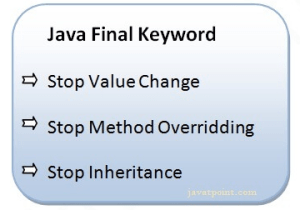
In Java, the final variable is used to restrict the user from updating it. If we initialize the final variable, we can’t change its value. In other words, we can say that the final variable once assigned to a value, can never be changed after that. The final variable which is not assigned to any value can only be assigned through the class constructor.
public class Bike9 {
//final int speedlimit=90;//final variable
int speedlimit=90;//final variable
void run(){
speedlimit=400;
System.out.println(speedlimit);
}
public static void main(String[] args) {
Bike9 obj=new Bike9();
obj.run();
}
}
Output:
Compile Time Error
Question 91: What is the final method?
If we change any method to a final method, we can’t override it
public class Bike {
//final void run(){System.out.println(“running”);}
void run(){System.out.println(“running”);}
}
public class Honda extends Bike{
void run(){System.out.println(“running safely with 100kmph”);}
public static void main(String args[])
{
Honda honda= new Honda();
honda.run();
}
}
Answer:
Output:
Compile Time Error
Question 92: What is the final class?
If we make any class final, we can’t inherit it into any of the subclasses.
//final class Bike{}
public class Bike {}
public class Honda1 extends Bike{
void run(){System.out.println(“running safely with 100kmph”);}
public static void main(String[] args) {
Honda1 honda= new Honda1();
honda.run();
}
}
Answer:
Output:
Compile Time Error
Question 96: What is the output of the following Java program?
public class Main {
public static void main(String[] args) {
final int i;
i = 20;
System.out.println(i);
//i = 30;
//System.out.println(i);
}
}
Answer:
Output
20
Explanation
Since i is the blank final variable. It can be initialized only once. We have initialized it to 20. Therefore, 20 will be printed.
Question 97: What is the output of the following Java program?
public class Base {
protected void getInfo()
//protected final void getInfo()
{
System.out.println(“method of Base class”);
}
}
public class Derived extends Base{
protected final void getInfo()
{
System.out.println(“method of Derived class”);
}
public static void main(String[] args) {
Base obj = new Base();
obj.getInfo();
}
}
Answer:
Output
Derived.java:11: error: getInfo() in Derived cannot override getInfo() in Base
protected final void getInfo()
^
overridden method is final
1 error
Explanation
The getDetails() method is final; therefore it can not be overridden in the subclass.
 Computer Software Training College, USA